How to Set Up a Testing Environment for kubevirt-actions-runner
Goal
This guide explains how to configure a local test environment for validating kubevirt-actions-runner.
The objective is to provision a lightweight Kubernetes cluster capable of running virtual machines via KubeVirt and verify the full execution flow:
Runner Pod → VirtualMachineInstance → VM Boot → Job Execution → Cleanup
Note: The environment created by this guide is intended for functional testing and development, not production use.
Prerequisites
Ensure the following requirements are met:
- A Linux distribution installed (bare metal or VM)
- Bash 3+
- A passwordless sudo account
- Internet access (to download dependencies and container images)
Architecture Overview
This testbed uses:
kindto create a local Kubernetes cluster running in Docker.- KubeVirt to enable VM workloads inside Kubernetes.
- A VM template that is cloned dynamically by the runner.
- A demo workload to validate VM lifecycle management.
The following diagram shows the control flow between GitHub, the Kubernetes cluster, KubeVirt resources, and the ephemeral VM.
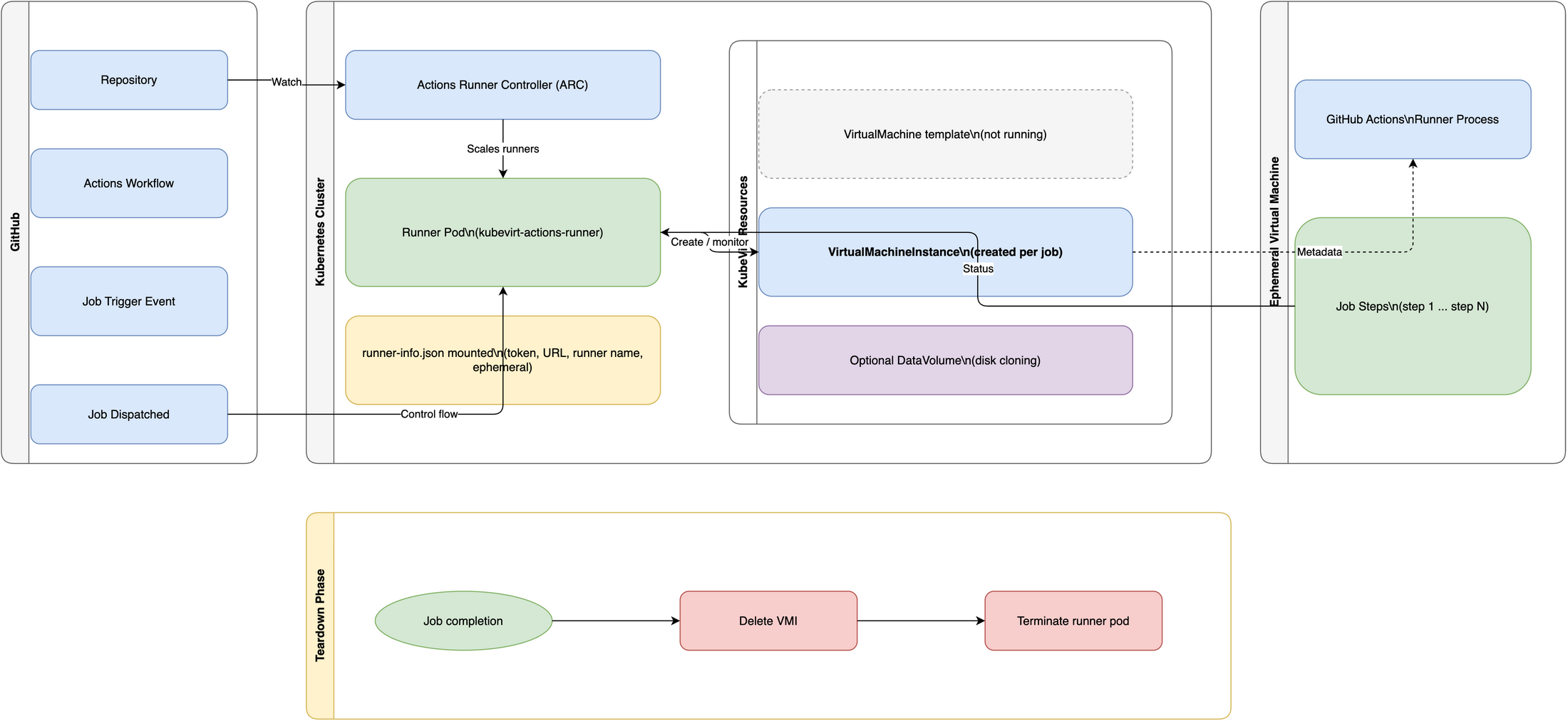
Deployment Flow
For a detailed view of the deployment and runtime sequence, see the Architecture Overview.
Automated install
The main.sh script orchestrates the full setup:
- Tool installation
- Kubernetes cluster creation
- KubeVirt deployment
- VM template registration
```bash { name=how-to-deploy.main} cd scripts ./main.sh
### What the automation does

- Install tools: runs [`install.sh`](../scripts/install.sh).
  - Installs `kind`, `kubectl`, `docker`, `go` and `helm` when they are not present.

- Configure cluster: runs [`configure.sh`](../scripts/configure.sh).
  - Creates a local Kubernetes cluster with `kind` (if it does not already exist).
  - Installs the KubeVirt operator and required components.
  - Applies [a runner VM template](../scripts/test-data/vm.yaml) used by the scripts.
    That template is an example base object the runner clones into
    ephemeral `VirtualMachineInstance` (VMI) objects when processing jobs.

## Run the demo

The repository includes `scripts/demo.sh`. It simulates a job that
triggers the runner to create a small VMI and run a simple workload.

```bash { name=how-to-deploy.demo}
cd scripts
bash ./demo.sh
This confirms that:
- The runner has proper RBAC
- KubeVirt is functioning
- VM creation and teardown work correctly
Centralize templates in a single namespace
Use a dedicated namespace for your VM templates and run runners in separate namespaces. This pattern gives you one golden template source, reduces copies, and makes template updates easier to govern.
Example:
kubectl create namespace kar-templates
kubectl apply -f test-data/vm.yaml -n kar-templates

export KUBEVIRT_VM_TEMPLATE=testvm
export KUBEVIRT_VM_TEMPLATE_NAMESPACE=kar-templates
export RUNNER_NAME=test

./kar -t "${KUBEVIRT_VM_TEMPLATE}" -n "${KUBEVIRT_VM_TEMPLATE_NAMESPACE}" -r "${RUNNER_NAME}" -c test-data/runner-info.json
In this setup,
the template is retrieved from kar-templates,
while runner resources are created in the namespace configured in your active kube context.
Verification
Confirm the kind cluster is running and KubeVirt is healthy:
kind get clusters
kubectl get nodes
kubectl get pods -n kubevirt
kubectl get kubevirt -n kubevirt
Verify the VM template was registered successfully:
kubectl get vm -A
For runner-specific verification steps (inspecting pods, VMIs, and logs), see the Quick Start verification section.
Next steps
- Customize the VM template to match workload and image requirements. Replace emulation with hardware virtualization (KVM) for better performance.
- Harden RBAC and Helm values for production environments.
- Adjust Helm values for production environments.