Large diff summarization chain
When the staged diff gets too large for a single model request, the hook falls back to a deterministic summarization pipeline. The goal is to keep the meaningful change set, while avoiding context-window problems and noisy prompt bloat.
Why this is needed
Large changesets are common in feature work and refactors. If the raw diff is sent directly, a model can miss important files, lose signal in generated artifacts, or fail outright when the prompt exceeds the configured budget.
The project therefore protects generation with two steps:
- A model-aware token-budget check.
- A summarized fallback when the raw diff is still too large.
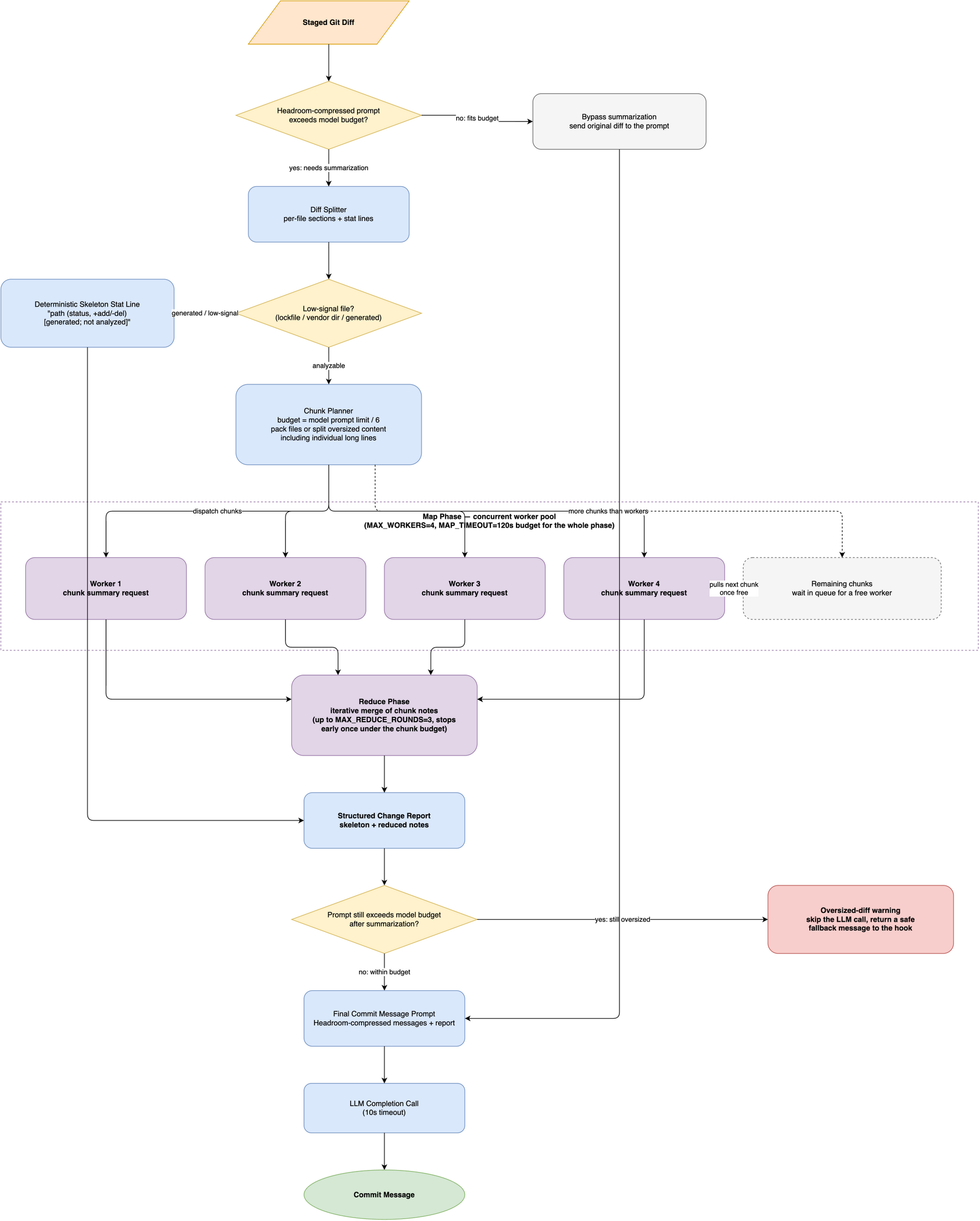
The budget follows the model
Before the hook plans any summarization work, it asks LiteLLM for the configured model’s max_input_tokens value. The hook reserves 1,024 tokens for the response. If LiteLLM has no metadata for the model, the hook uses an 8,192-token context-window fallback, which leaves 7,168 tokens for the prompt.
The chunk budget is one sixth of that resolved prompt limit. A smaller-context model therefore receives smaller map and reduce requests, while a larger-context model can process larger chunks with fewer calls. The same resolved prompt limit governs Headroom compression, the initial oversized-prompt check, and the check after summarization.
Deterministic preprocessing
Before the model ever sees the diff, the pipeline filters and anchors it.
Low-signal file handling
Generated or vendor-heavy files are marked as low-signal and skipped from semantic summarization. Examples include lockfiles and vendored directories. This keeps the prompt focused on the architecture and behavior changes, not on generated noise.
File-level anchoring
The diff is also inspected for exact file paths, modification types, and added or removed line counts. This creates a ground-truth skeleton that the model can use without inventing missing file details.
For a change set wide enough to make the skeleton itself expensive, the list is capped and closed with a count of the remaining files. The prompt still states how large the change is, without spending its budget on an unbounded inventory.
For a small change touching two files, the skeleton looks like this:
- src/app.py (modified, +12/-3)
- poetry.lock (modified, +40/-2) [generated; not analyzed]
poetry.lock is skipped from the map phase entirely, but it still appears in the skeleton so the final report accounts for every changed file.
Two units of work: chunks and parts
The rest of the pipeline works with two terms:
- a chunk is one summarization request
- a part is one fragment of a file that is too large to summarize in a single request
Every chunk holds either one part, one whole file, or several whole files. That single vocabulary is what lets the chain adapt to very different change sets without changing its shape.
Map phase: summarize each chunk
The summarization pass plans chunks first, then sends one request per chunk. Planning walks the diff in order, so files that sit next to each other stay in the same request.
Chunks are summarized concurrently, up to a small worker limit, and the whole map step is bounded by a timeout. If that timeout is reached, the chain proceeds with whatever chunk summaries completed in time, rather than blocking the commit indefinitely on one slow request.
| Change set | Planning outcome |
|---|---|
| One file larger than the budget | Split into numbered parts, one request per part |
| Many files with small diffs | Packed together until the token budget or the file limit is reached |
| A few files with substantial diffs | One request each, because a second file would not fit |
| Mixed sizes | Pending files are sent before the split file, preserving diff order |
Each chunk also gets the prompt that matches its shape. A whole-file chunk asks for a short summary of that file. A part asks for a summary of that fragment only, and states that the other fragments are handled elsewhere. A multi-file chunk asks for one bullet per file, so a trivial edit still gets its own line instead of being folded into another file’s note.
Two failure modes disappear as a result. A large file no longer drowns out smaller but more important edits, because it is split instead of truncated. A single line that exceeds the chunk budget is split further, so minified content or an unusually long data line cannot bypass the limit. A change touching dozens of small files no longer costs dozens of requests, because those files travel together. The number of requests tracks the size of the change, not the number of files in it.
Reduce phase: merge notes back together
Once the per-chunk summaries exist, the pipeline merges them until they fit the allowed summarization budget. It keeps unique changes, removes duplicated observations, and produces a compact report that keeps the essential intent of the diff.
The result is not a generic summary. It is a structured view of what changed, where it changed, and which files matter most.
Fallback behavior
If the summarization chain produces no chunk summaries at all, it falls back to the original diff. If the resulting prompt still exceeds the budget after that, the tool skips the LLM call entirely and returns a safe oversized-diff warning instead of sending a request the provider would reject.
That turn of behavior matters: most commit-generation workflows prefer a controlled, visible fallback over a bad or blank message.
Practical outcome
The final prompt reaches the model with a compact, grounded description of the staged change set. The commit message then reflects the actual intent of the diff, without overwhelming the model with unrelated churn or generated artifacts.
The prompt and chunk token budgets follow LiteLLM’s metadata for the selected model. The files-per-chunk limit, skeleton cap, reduce rounds, worker count, and map timeout remain named safeguards in the summarization module.
See How the hook works for the overall lifecycle, Headroom prompt compression for the optional token-saving layer, and Configuration for the settings you can change yourself.