ai-prepare-commit-msg sits in Git’s prepare-commit-msg lifecycle and turns staged changes into a draft commit message. The design stays simple: Git continues to own the commit, while the tool proposes the message and leaves final approval to you.
What happens at commit time
Git runs the hook before the message editor opens. At that point the tool:
- Reads the staged diff from the repository.
- Builds the prompt using the configured YAML template and the staged content.
- Resolves a safe prompt limit from LiteLLM metadata for the configured model.
- Optionally compresses the prompt with Headroom.
- Estimates the compressed prompt and summarizes an oversized diff when needed.
- Calls LiteLLM with the final prompt.
- Validates the model output and retries on empty responses.
- Optionally asks a decision model to choose the Conventional Commit type.
- Requests your approval and writes the draft into Git’s
COMMIT_EDITMSGfile.
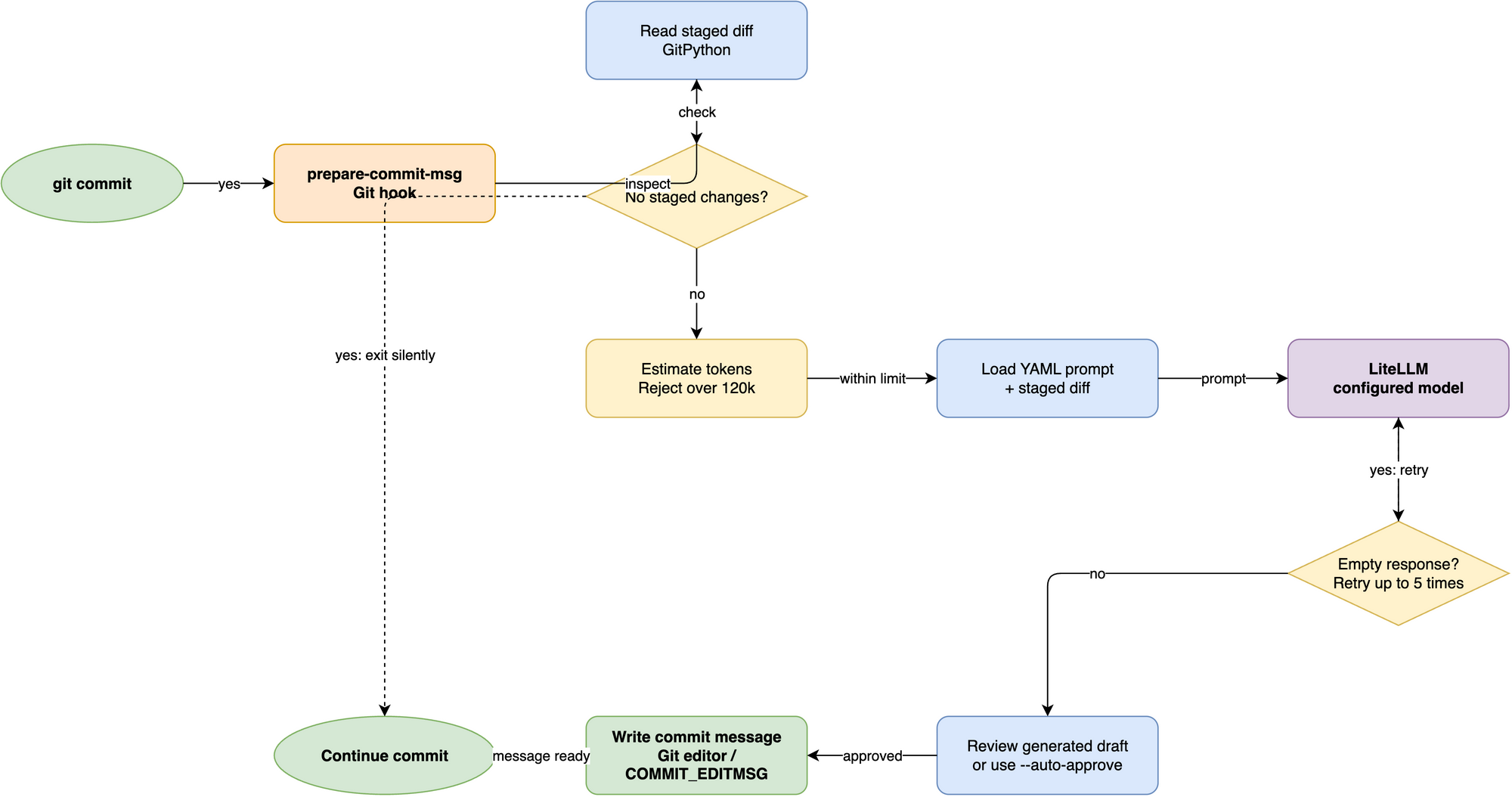
Runtime flow
The execution path is intentionally small and predictable. The CLI reads staged data, constructs a prompt, delegates the request to LiteLLM, and writes the approved text back to Git.
The key safety checks are:
- no staged changes: exit silently
- unknown model metadata: use the conservative 8,192-token context fallback
- oversized prompt: summarize and measure again before sending
- empty response: retry within the configured limits
- no interactive terminal: require
--auto-approveor fail
This keeps the hook useful in both local developer workflows and scripted automation.
Prompt construction
The default prompt file gives the model shared writing guidance for a concise imperative description and optional body. The runtime adds a system instruction for the first-line format: a Conventional Commit header without a decision URL, or an untyped description when a decision URL is set. This instruction is included before compression and token-budget checks. The runtime code injects the actual staged diff as the user message, so policy and content stay separate.
The user prompt is intentionally narrow: commit messages are generated from the diff, not from whole-project context or unrelated repository metadata.
Optional type selection
With a decision API URL configured, LiteLLM generates a description and optional body without a type prefix. The hook sends that text to a TypeSafe-compatible decision service, which chooses the Conventional Commit type before the hook presents the message for approval. Without a decision URL, LiteLLM generates the full message as before.
The official Jev endpoint requires a TypeSafe API key. An Ollaya-compatible endpoint accepts an unauthenticated request unless its server requires a key. The hook stops without writing a message if the decision request fails or returns an unsupported type. See Choose commit types with a decision model for setup and Configuration reference for settings.
Why LiteLLM is the boundary
LiteLLM provides a common interface for multiple model providers. The hook does not care whether the backend is OpenAI, Anthropic, GitHub Copilot, or a custom gateway. It only needs a model identifier and a working provider configuration.
LiteLLM also provides the model’s maximum input size. The hook reserves 1,024 tokens for the response and uses the remainder as the prompt limit. When LiteLLM has no metadata for a model identifier, the hook assumes an 8,192-token context window instead of risking a request sized for a much larger model.
That design also keeps provider-specific logic outside the project. Custom providers can be registered through the ai_prepare_commit_msg.litellm_providers entry point group, which is documented in Add a custom LLM provider.
Why prompt optimization exists
The hook is designed for normal developer use, but staged diffs can be large. A large raw diff increases cost and can exceed a model’s context window. The project therefore includes two optimization layers:
- optional prompt compression via Headroom
- deterministic summarization for oversized diffs
Those steps are described in the companion pages:
Output and approval model
The generated result is a draft, not a forced commit message. When a terminal is available, the hook displays the message and waits for approval before writing it. When automation is running without a terminal, the user must explicitly opt into --auto-approve.
This gives a clean boundary between suggestion and final commit authoring.
Failure handling
The hook treats empty or unusable model output as recoverable data loss, not as success. It retries on transient failures and stops cleanly when the model cannot produce a valid message.
That keeps the commit flow safe: no blank message writes silently into Git, and no large diff is sent without a guardrail.