How to configure runner timeouts
Goal
This guide explains how to configure the VMI wait timeout and the cleanup timeout
for the kubevirt-actions-runner application.
Use these settings to tune behavior for long-running VM-backed GitHub Actions jobs
or to adjust the grace period given to resource cleanup.
Prerequisites
kubevirt-actions-runneris installed and functional.- Basic knowledge of environment variables and shell commands.
Configuration
Timeouts are configured via environment variables. Below is a summary of the available options:
| Environment Variable | Default | Description |
|---|---|---|
KAR_WAIT_TIMEOUT |
1h0m0s |
Maximum time to wait for a terminal VMI phase (Succeeded/Failed). |
KAR_CLEANUP_TIMEOUT |
5m0s |
Maximum time allowed for resource cleanup after job completion. |
Both variables accept any valid Go duration string,
for example 30m, 1h, or 90s.
Invalid values are logged and the default is used instead.
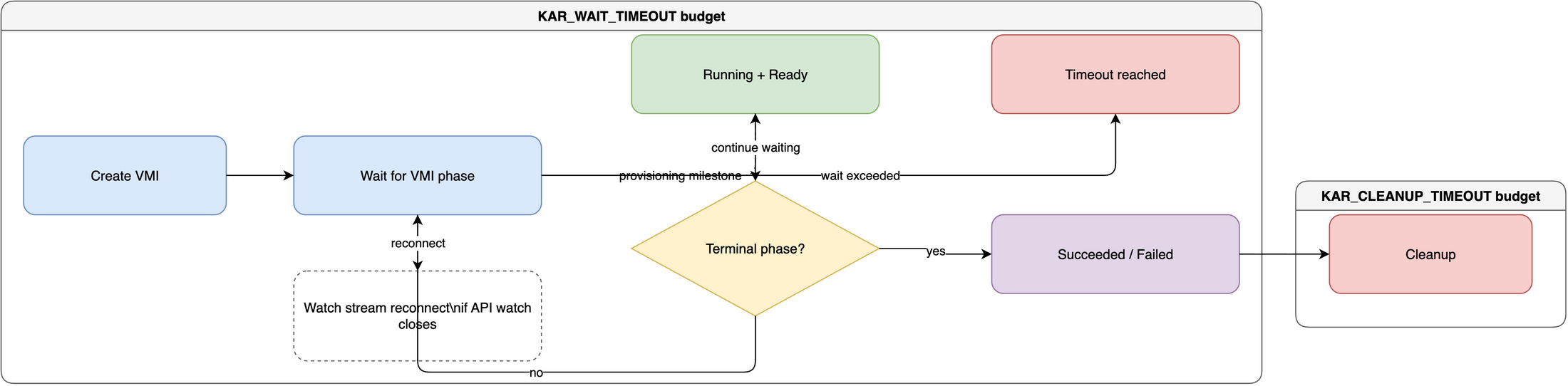
The following diagram shows how KAR_WAIT_TIMEOUT
and KAR_CLEANUP_TIMEOUT apply to the runtime lifecycle.
VMI provisioning-success semantics
The runner logs a provisioning milestone as soon as
the VMI reaches the Running phase and the KubeVirt Ready condition
becomes True.
At that point the runner records the milestone in the telemetry span and
continues watching,
without treating this event as a terminal success.
The runner exits its wait loop only when a terminal phase is observed:
Succeeded– the job completed successfully; cleanup proceeds normally.Failed– the job failed; the runner returns an error and cleanup proceeds.
This means long-running jobs (jobs that keep the VM alive for many minutes
or hours) are correctly tracked:
the Running + Ready milestone tells you the VM became usable,
while the terminal Succeeded/Failed phase ends the wait.
The wait timeout (KAR_WAIT_TIMEOUT) therefore needs to cover the entire
expected job duration, not just provisioning time.
Watch stream reconnection
Kubernetes API watch streams can close during long-running jobs, even when the VMI is still running correctly. When this happens, the runner checks the current VMI phase and opens a new watch stream. This avoids treating an API-server watch timeout as a job failure.
The reconnect loop still uses KAR_WAIT_TIMEOUT as the total wait budget.
If the VMI never reaches Succeeded or Failed before that timeout expires,
the runner exits with a wait-timeout error.
Steps to configure KAR_WAIT_TIMEOUT
1. Set the environment variable
Increase the wait timeout to 30 minutes:
export KAR_WAIT_TIMEOUT=30m
Or reduce it for faster failure detection in environments where VMs boot quickly:
export KAR_WAIT_TIMEOUT=3m
2. Run the application
./kar -t vm-template -n default -r my-runner -c '<jit-config>'
At startup the runner logs the effective timeout:
wait timeout is set to: 30m0s
If an invalid value is provided, the runner logs a warning and falls back to the default:
Invalid KAR_WAIT_TIMEOUT value: "bad-value", using default 1h0m0s
Steps to configure KAR_CLEANUP_TIMEOUT
1. Set KAR_CLEANUP_TIMEOUT
export KAR_CLEANUP_TIMEOUT=10m
2. Restart the runner
./kar -t vm-template -n default -r my-runner -c '<jit-config>'
At startup the runner logs the effective timeout:
cleanup timeout is set to: 10m0s
Next Steps
- Enable telemetry to observe provisioning latency. See How to enable Telemetry.