How to enable Telemetry
Goal
This guide explains how to enable and configure telemetry for the kubevirt-actions-runner application. By following this guide, you will be able to collect distributed traces for key operations, enabling better observability and debugging.
Prerequisites
Ensure the following requirements are met:
kubevirt-actions-runneris installed and functional.- Access to an OpenTelemetry-compatible backend (e.g., Jaeger, DataDog).
- Basic knowledge of environment variables and shell commands.
Overview
Telemetry in kubevirt-actions-runner is powered by OpenTelemetry. It supports two export types:
- OTLP Exporter: Sends traces to an OpenTelemetry Protocol (OTLP) endpoint, such as Jaeger or DataDog.
- Stdout Exporter: Outputs traces to the console for local debugging.
The following diagram summarizes the telemetry flow and exporter routing.
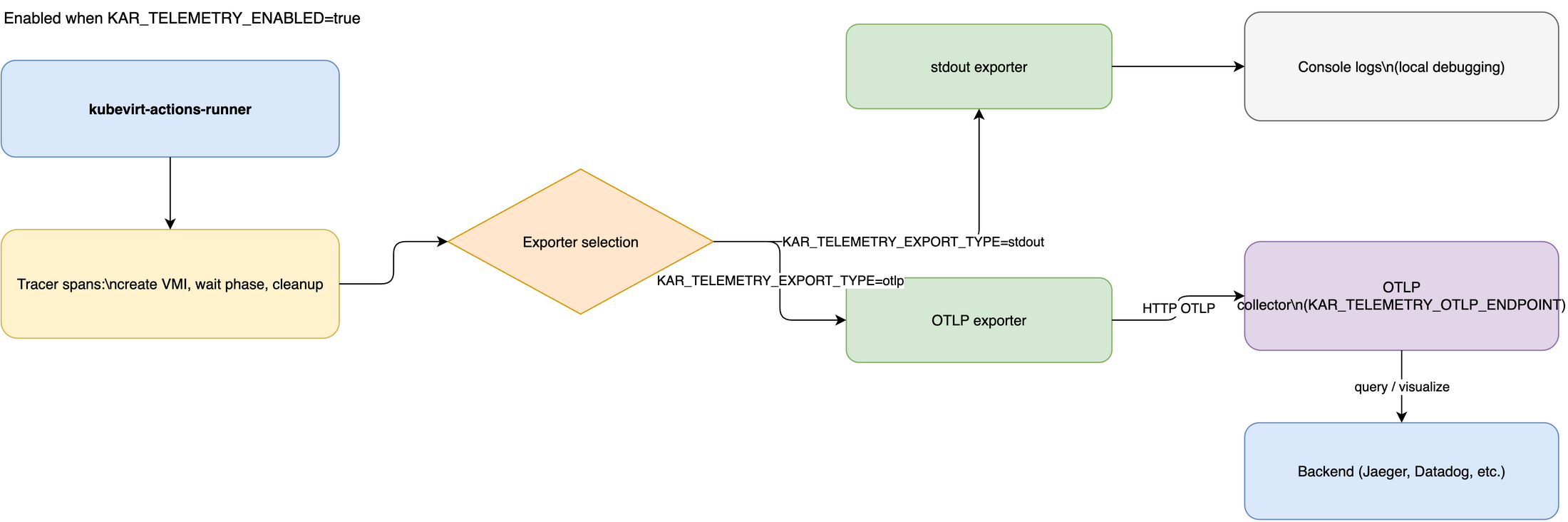
Configuration
Telemetry is configured via environment variables. Below is a summary of the available options:
| Environment Variable | Default | Description |
|---|---|---|
KAR_TELEMETRY_ENABLED |
false |
Enable or disable telemetry (true or false). |
KAR_TELEMETRY_EXPORT_TYPE |
`` | Export type: otlp or stdout. |
KAR_TELEMETRY_OTLP_ENDPOINT |
localhost:4318 |
OTLP collector HTTP endpoint (only for otlp export type). |
KAR_TELEMETRY_SERVICE_NAME |
kubevirt-actions-runner |
Service name for telemetry. |
KAR_TELEMETRY_SERVICE_VERSION |
unknown |
Service version for telemetry. |
Steps to Enable Telemetry
1. Enable Telemetry
Set the KAR_TELEMETRY_ENABLED environment variable to true:
export KAR_TELEMETRY_ENABLED=true
2. Choose an Exporter
OTLP Exporter
To send traces to an OTLP-compatible backend, set the following variables:
export KAR_TELEMETRY_EXPORT_TYPE=otlp
export KAR_TELEMETRY_OTLP_ENDPOINT=<your-otel-endpoint>:4318
export KAR_TELEMETRY_SERVICE_NAME=my-runner-service
export KAR_TELEMETRY_SERVICE_VERSION=1.0.0
Replace <your-otel-endpoint> with the URL of your OTLP collector.
Stdout Exporter
For local debugging, use the stdout exporter:
export KAR_TELEMETRY_EXPORT_TYPE=stdout
export KAR_TELEMETRY_SERVICE_NAME=my-runner-service
export KAR_TELEMETRY_SERVICE_VERSION=1.0.0
3. Run the Application
Start the kubevirt-actions-runner application with telemetry enabled:
./kar -t vm-template -n default -r my-runner -c '<jit-config>'
Verification
If using the OTLP exporter, verify that traces are visible in your observability platform (e.g., Jaeger, DataDog).
Example: Jaeger
-
Start Jaeger locally:
docker run -d --name jaeger \ -p 4318:4318 \ -p 16686:16686 \ jaegertracing/all-in-one -
Open Jaeger UI at
http://localhost:16686and search for traces under the service name you configured.
If using the stdout exporter, verify that trace logs are printed to the console.
Next Steps
- Integrate telemetry with your preferred observability platform.
- Use the collected traces to analyze and optimize application performance.
- Refer to the OpenTelemetry documentation for advanced configurations.