How the processing pipeline works
The application treats a video as a record that can be enriched over time. Storage backends supply existing records, the YouTube client supplies missing metadata and transcript text, and the LLM client supplies the analysis fields. The service compares the persisted fields before and after processing, so it does not rewrite an unchanged video.
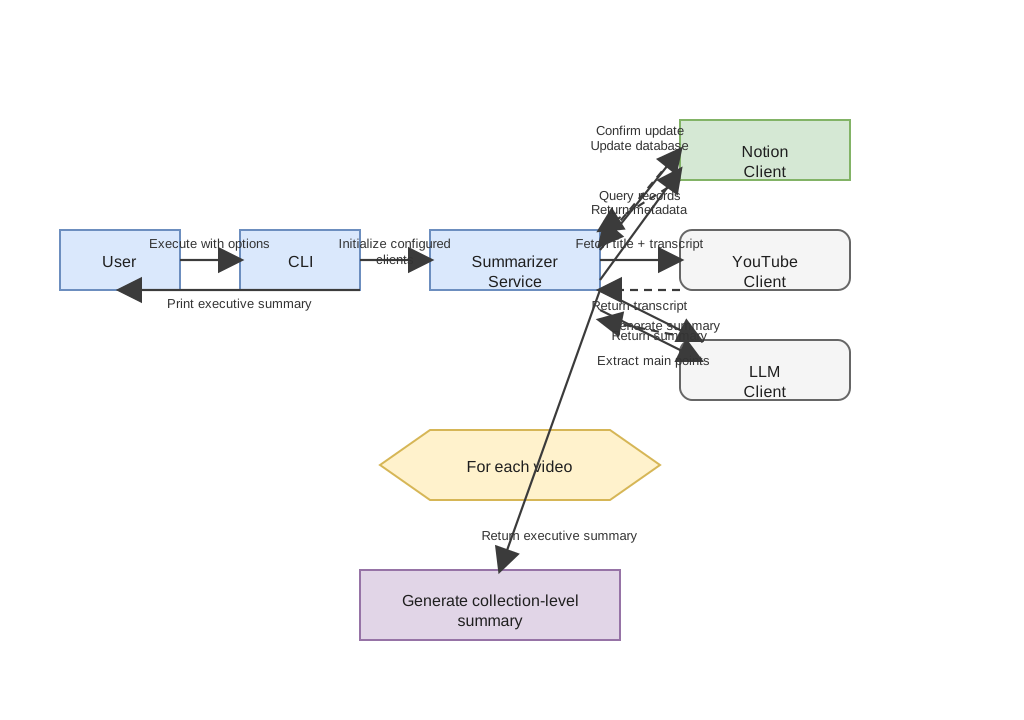
The source diagram is stored in the draw.io format at ../assets/processing-pipeline.drawio and was converted from the Mermaid version to a draw.io-backed asset.
Storage behavior
Notion and filesystem storage are independent backends. Notion mode reads database rows and updates their persisted properties. Filesystem mode writes an OKF bundle consisting of a root index, a playlist index with an executive overview and linked talk table, a per-playlist executive report, and one Markdown note per video. Video notes include the summary, main points, and a linked YouTube thumbnail. When both are configured, successful changes are written to both backends.
Analysis behavior
Each video summary is limited to 2,000 characters and each main-points result is limited to 2,000 characters by the prompts sent to the model. The executive summary is limited to 6,000 characters. Before each LLM request, Headroom attempts prompt compression. The client then counts the complete prompt, including system instructions, against the model’s LiteLLM input-token limit, reserving 1,024 tokens for the response. Unknown models use an 8,192-token fallback limit; unavailable tokenizers use a conservative UTF-8 byte-based estimate with message overhead. Responses are capped at 1,024 tokens in addition to the character limits requested by the prompts.
If compression is unavailable, fails, or leaves the prompt too large, the client splits the source into token-budgeted excerpts, summarizes them in order, and combines the partial summaries. This map-reduce process works for every provider and applies to video summaries, main points, and executive summaries. Inputs that already fit need only one request.
The executive summary uses only non-empty video summaries. Large collections are reduced in groups of 25 summaries until one result remains.
Failure boundaries
Transcript retrieval returns no transcript for age-restricted, unavailable, unplayable, disabled, or unsupported-language videos, so those videos cannot be analysed during that run. Connection failures from the configured LLM endpoint become an actionable CLI error and end the process with a non-zero exit status. If reduction stops making progress, exceeds five passes, or the instructions alone exhaust the budget, analysis fails explicitly rather than truncating the source or sending a known oversized request. A model with a larger context window may be needed.